 +91 253 6630710
 781.258.1274
 +44 (0) 7446 87 37 97
Testing


Testing
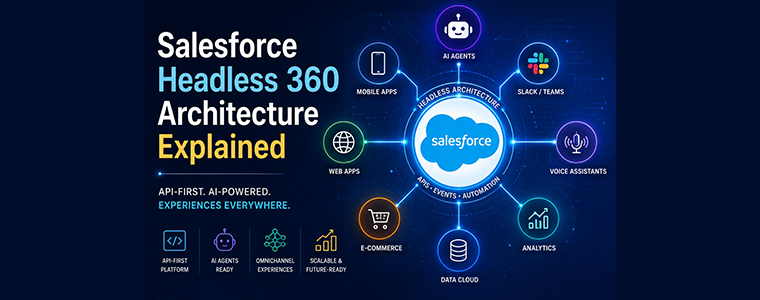
Executive Summary: Salesforce's new Headless 360 architecture turns the entire platform into an API-driven system. In this model, every piece of data and business logic (Customer 360, Data 360, workflows, etc.) is accessible via APIs, MCP tools, or CLI commands. Developers and even AI agents can now build and act on Salesforce data without ever using the browser UI. The traditional Salesforce UI becomes optional. You can deploy custom front-ends (Slack bots, web apps, mobile apps) or AI agents that call Salesforce programmatically. This blog explains what Salesforce headless means, its benefits and challenges, integration patterns (REST/GraphQL APIs, MuleSoft, Platform Events, Streaming), architecture and data flows (with diagrams), implementation steps, best practices, a migration checklist, and real-world examples.
Blog Highlights:
- API-First Platform: Salesforce Headless 360 means "everything on the platform is now an API, an MCP tool, or a CLI command" – even Customer 360 apps, AI agents, and Slack bots. In other words, the UI is optional.
- Four-Layer Architecture: Key components are Data 360 (the unified data cloud), Customer 360 (business logic/workflows), Agentforce (build/manage AI agents), and Slack (engagement layer). Salesforce provides these "systems" as APIs (Data 360 API, Metadata API, etc.) for headless use.
- Integration Patterns: Headless Salesforce still uses familiar integration patterns, but with new consumers (AI agents). All APIs must be safe to try. You can expose data via REST/SOAP or GraphQL, pub/sub events (Platform Events/Streaming), or MuleSoft. MuleSoft's MCP Bridge lets you expose existing APIs as MCP tools without rewriting them.
- Benefits: Enables omnichannel, AI-driven workflows built once and run anywhere. For example, the same logic can work in Slack, mobile, web or voice apps, and AI agents can automate tasks. Developers gain a "build once, render anywhere" experience.
- Challenges: Requires strong governance. You must move UI logic to the server (validation rules, triggers), design for concurrency (agents may fire many calls in parallel), and respect API/Governor limits (agents still have only 100k API calls/day, 100 SOQLs per transaction, etc.). Authentication must use JWT/OAuth (no interactive login) and the Einstein Trust Layer enforces data masking and security automatically.
- Implementation & Migration: Steps include auditing existing processes, moving logic out of pages into rules/triggers, setting up MCP tools/connected apps, enabling JWT auth, and deploying agents via CLI. We provide a migration checklist and best practices (use named credentials, scope OAuth apps, ground your metadata, test non-UI paths, etc.).
- Examples: Early adopters are seeing big gains. Notion cut its sales cycle from 4 months to 3 weeks, and DocuSign sped up contract approvals by 60%, thanks to headless Agentforce workflows. CSL Behring (life sciences) used Data 360 and Agentforce to aggregate 20 data streams and achieved 300,000+ donor conversions. Engine (a travel company) built a Slackbot "Eva" agent in 12 days; Eva now handles 50% of chat cases, cutting average support time by 15% and sales-research time by 40%.
1. What Is Salesforce Headless 360?
In Salesforce headless architecture, the front-end (UI) is decoupled entirely from the backend platform. Salesforce continues to house all data, automation, AI models and business logic, but you build custom user experiences separately (e.g. React, web/mobile apps, Slack bots) and connect them via APIs. In practice, this means:
- Traditional Salesforce: Users navigate Lightning/UIs/Experience Cloud pages to view and update data. Business rules often enforce via screen flows or UI validation.
- Headless Salesforce: Users (or AI agents) call Salesforce's data and logic through APIs and services. The UI layer could be anything (Slack, voice, custom app) and is "headless" to the back end.
| Characteristic | Traditional Salesforce | Headless Salesforce 360 |
|---|---|---|
| UI Layer | Lightning pages, Experience Cloud, Setup menus | Custom front-ends (Slack/Teams, mobile apps, web apps) or AI agents via APIs |
| How to Build | Use Salesforce UI tools (Flows, Pages, Components) | Use Salesforce APIs/CLI/MCP; build with external frameworks (React, Angular, Vue, etc.) |
| Interaction | Humans clicking buttons and tabs | AI agents or code invoking REST/GraphQL calls or CLI commands |
| Business Logic | Often enforced in UI (validation rules on screens, dynamic forms) | Enforced server-side (validation rules, triggers, flows) – logic must reside in the platform, not the UI |
| Data Access | Via UI listings and manual entry | Via REST/SOAP/GraphQL APIs, Platform Events, CDC, or Data Cloud connectors |
| Examples | Sales rep logs into Sales Console and updates an opportunity | Chatbot or AI agent queries Salesforce APIs to update opportunities without a browser |
The Trailhead guide explains it simply: "Salesforce Headless 360 transforms the Salesforce Platform into a fully programmable system where everything is accessible via APIs, MCP tools, or CLI commands enabling both your team and AI agents to build and act without relying on traditional UIs". In short, "our API is the UI". As one architect notes, headless does not mean losing Salesforce's power, it means building experiences that use Salesforce's data and logic behind the scenes.
Figure: Salesforce Data 360 architecture (real-time unified data layer). The headless platform lets agents and apps query this unified data without a UI.
2. Benefits of Headless Architecture
- Omnichannel Experiences: Build once, run anywhere. A workflow or UI component created for Salesforce can be "rendered natively" in Slack, mobile apps, web, voice, etc. no separate apps needed. For example, a single approval process could appear as a Slack button or voice response.
- AI Agents & Automation: AI agents (e.g. ChatGPT, Claude) gain full access to Salesforce. They can "act" on your org just like a human, but programmatically. Tasks that required manual UI clicks (e.g. running reports, updating records) become automated. One customer built an AI "sales agent" that generates, deploys and tests new Apex code automatically.
- Faster Iteration: Decoupling UI allows front-ends to change without backend rework. Teams can iterate interfaces independently of Salesforce changes. Salesforce reports up to 40% faster dev cycles when using headless tools and CI/CD pipelines.
- Unified Data & Logic: The platform remains the system of record and business rules. Agents get the same context – approvals, sharing rules, triggers – that humans have. This preserves 20+ years of institutional knowledge (for example, accumulated customer history and SLA timers) and exposes it via APIs.
- Reduced Middleware: Because Salesforce itself can expose MCP tools (via MuleSoft or hosted MCP servers), you may need less custom middleware. For instance, MuleSoft's new MCP Bridge can safely expose your existing APIs to agents under the same gateway and policies you already use.
3. Challenges and Considerations
- Governance & Security: AI agents and external apps now consume your APIs, so strict controls are critical. Use OAuth JWT flows for authentication (no browser login) and tightly scope each Connected App. Employ Salesforce's Einstein Trust Layer: it enforces data masking (PII redaction), grounds agents in your org data, and respects FLS and sharing rules. You cannot turn this off — it's automatic for all agentic interactions.
- API & Governor Limits: Headless consumers count against the same limits as any integration. The enterprise limit is ~100,000 API calls per 24h, and each agent transaction still only has 100 SOQL queries, 150 DML, 6MB heap, etc. In fact, agents often consume limits faster: they may fire hundreds of queries in one chat, draining quotas quicker than manual use. Design each API/tool to be efficient and idempotent. For high-volume tasks, use Bulk APIs or batch processing to stay within limits.
- Transactional Integrity: In a human-driven UI, workflows are often sequential. Agents make calls in unpredictable order during "reasoning." Hence every exposed tool must be idempotent — e.g. updating a record twice has no side effect. Test for race conditions, and use transaction-handling (named credentials, record locking, etc.) where needed.
- Quality Metadata: Agents read your metadata (field names, descriptions, validation rules) instead of forms. Poorly documented fields become confusing for an agent. For example, a "Status" field with no label and many values is a recipe for agent error. Best practice: treat field definitions and picklists as the agent's instruction set and give them clear names, descriptions, and well-defined rules.
- Testing and Validation: Traditional UAT (clicking through pages) doesn't apply. Instead, use the Agentforce Testing Center or custom test runs to simulate agent calls. Expand system integration tests to cover non-linear sequences of API calls, since agents might invoke APIs in unexpected orders. Automate "agentic" testing at scale.
4. Architecture Patterns & Integration Methods
Salesforce headless still relies on familiar integration patterns; what changes is who calls them (AI agents instead of humans). The table below compares common integration options:
| Integration Method | Description | Use Case | Pros | Cons |
|---|---|---|---|---|
| REST/SOAP APIs | Standard Salesforce data and metadata APIs | Read/update records, metadata (CRUD operations) | Broad capabilities; well-supported in Salesforce tools | Counts against API limits; may require many calls for complex data structures |
| GraphQL API | Salesforce's GraphQL endpoint for flexible queries | When clients need nested or filtered data in one call | Precise data fetching; single-call for related data | Newer tech; must handle authentication and rate limits similarly |
| Platform Events | Pub/Sub messaging system for events | Event-driven workflows (async notifications) | Decoupled, real-time triggers; scalable subscribers | Agents must wait/poll for results; potential duplicates; low TTL |
| Streaming API | CometD-based real-time change notifications (PushTopics/CDC) | Monitor record changes or streams | Near-real-time; no polling needed on client | Limited retention; complex to set up; older model than Data Cloud |
| Data Cloud/Data Actions | Salesforce Data 360 connectors and actions for unifying data | Large data integrations (customer profiles, segments) | Over 270 connectors; zero-copy federation; analytics-ready | Requires Data Cloud license; learning curve on data modeling |
| MuleSoft (MCP Bridge) | MuleSoft API gateway exposing APIs as MCP tools | Enterprise SAP/ERP or legacy systems integration | No code changes; enforces governance at gateway | Requires MuleSoft platform and expertise; added infrastructure |
| External Services | Declarative REST integration in Flows (OpenAPI/Schema) | Low-code calls to public APIs | Easy to import schemas; good for known external APIs | Limited to JSON/Swagger; not flexible for complex logic |
Key points: REST/GraphQL APIs remain the foundation for direct data access. Salesforce also now supports hosted GraphQL queries for LWC and agents. Platform Events and the Streaming API can decouple processes and feed events into headless flows (use Platform Events for enterprise event bus, Streaming API for legacy real-time notifications). For existing integrations, MuleSoft's MCP Bridge can publish your APIs as agent-friendly MCP tools under your gateway policies.
Agents treat all of these the same: they "call a tool or API, get a result." For example, an agent might invoke an MCP tool that under the hood executes a series of REST calls. Salesforce's integration architect notes: "Data virtualization is unchanged as a pattern: external data is queried without being moved into Salesforce… The mechanism you use (MCP Bridge, external service, or other connector) depends on what your external system supports." In all cases, ensure tools handle retries gracefully, since an agent can invoke them multiple times.
5. Salesforce Headless Architecture (Data Flow Diagram)
A high-level flow of a headless agent interaction might look like this:
This sequence shows an AI agent or dev tool calling Salesforce (via API or a hosted MCP server). Salesforce fetches/updates data (possibly using Data 360 as the data mesh) and returns a result. Finally, the agent presents the outcome through a chosen UI (e.g. Slack). Throughout, no browser is involved.
These diagrams illustrate that agents and apps interact with Salesforce's data (Data 360) and logic (Customer 360) layers via programmable interfaces. Slack (or another channel) is just a front door – it can render interactive components, but all data/actions come from Salesforce's APIs.
6. Implementation Steps
To move to a headless architecture, follow these high-level steps:
- Audit & Refactor Business Logic: Review existing processes that rely on UI screens. Migrate any business rules out of the UI into validation rules, triggers, or flows at the object level. For example, convert conditional picklists or screen-flow filters into schema-level rules. This ensures logic is applied regardless of how data is updated.
- Design API Surface: Identify the key data and actions your headless apps or agents need. Create the necessary fields, objects, and if needed, custom APIs (Apex REST) or Flows. Make sure everything is accessible via API or an MCP tool.
- Set Up MCP Tools: In your Salesforce org, use the Agentforce/Developer Tools (or the CLI) to create MCP tools or flows and prompt templates. Salesforce now has hosted MCP servers that make your existing org's Apex classes, Flows, and even Prompt Templates available to any agent. Enable these so AI agents can call them as tools.
- Configure Authentication: Set up a Connected App for your headless clients. Use the JWT OAuth flow (certificate-based) for true headlessness. That means agents/dev pipelines can authenticate without a browser. Ensure the app's OAuth scopes include only what's needed (e.g. api, maybe refresh_token; omit web and userinfo scopes). Generate a key pair and upload the cert to Salesforce.
- Integrate Data Cloud (Data 360): If using Data Cloud, deploy your Data Packs (schemas, transforms) via CLI or DevOps Center. This ensures unified data is ready for agents to query. For external systems, configure MuleSoft or Data Cloud connectors as needed.
- Build/Deploy Agents and Interfaces: Develop your AI agents (e.g. using Agentforce Vibes or directly with the CLI). Define Agent Script flows, Apex actions, and prompts. Deploy them to your org via the CLI (
sf agent deploy). Build any UI components (Slack dialogs, Mobile screens) that will consume these agents or APIs. - Test and Validate: Use the Agentforce Testing Center for automated agent testing across scenarios. Write unit tests for your Apex and flows as usual, but also focus on idempotency (call your API twice in a test to ensure no double effects). Perform system tests in non-scripted sequences (agents might invoke tools in unexpected order).
- Deploy via CI/CD: Put all metadata and agent definitions under source control. Use Salesforce DevOps Center or SFDX to promote configurations. Since headless architecture encourages an API-centric workflow, leverage automation pipelines fully (Salesforce CLI, Vibe CLI, etc.).
- Monitor and Govern: After go-live, monitor API usage, set per-agent rate limits if needed, and review the Session Trace logs for agents. Use the Trust Layer's observability (OpenTelemetry/Datadog) to inspect agent queries. Periodically audit your Connected App scopes and IP restrictions.
7. Best Practices
- Centralize Logic: Don't rely on UI-driven conditions. Put all rules, calculations, and validations in back-end config (validation rules, triggers, flows, Apex). This ensures agents can enforce the same business rules without a screen.
- Idempotent Design: Design all exposed actions to be safe to repeat. For example, use Upsert or include deduplication logic. Test your tools under retries.
- Use Named Credentials: Store external endpoint details and auth in Named Credentials. This secures secrets and simplifies auth for outbound calls. For agents, ensure Named Credentials have sensible timeout and retry settings.
- Scope Connected Apps Tightly: Give agents only the OAuth scopes they truly need. For example, if an agent only needs to read/write records, use just
apiandrefresh_token. Remove any unused scopes likeweb. This principle of least privilege enhances security. - Rich Metadata: Flesh out field labels, descriptions, and help text. Define picklist labels and record types clearly. Agents use this metadata to understand your data model. For instance, descriptive Help Text on a field is like an instruction manual for the agent.
- Leverage Agent-Specific Tools: Use Salesforce's new Agentforce features – for example, Agentforce Vibes for code generation, and Prompt Builder/Prompt Templates for LLM prompts. Also make use of the Testing Center, Session Trace, and A/B Testing APIs to monitor agent performance.
- Handle Bulk Data Carefully: If an agent needs to process lots of records, prefer batch processes. 100k calls/day can be exhausted by one runaway agent flow. Use Queueables or Batch Apex for bulk workloads, and consider using Platform Events to queue asynchronous jobs.
- Performance Tuning: Remember agents can pack many operations into one "transaction." Keep each agent tool narrowly scoped to avoid hitting governor limits. Minimize SOQL queries (use relationships and single queries when possible), and avoid massive data scans.
- Secure Data: Trust Layer aside, also consider encryption or two-factor where needed. If exposing APIs externally (MuleSoft, API Gateway), enforce OAuth or mutual TLS on those channels.
- Documentation: Even though the UI is gone, document your "API contract" and data model. Keep a data dictionary handy for developers and AI trainers.
8. Performance & Security Considerations
- API Quota: Enterprise editions typically allow 100,000 API calls per 24h. Headless integrations and agents share this quota. If an agentic workflow requires many calls, consider raising your org's limits or optimizing calls. For example, combine multiple updates in a single REST call when possible.
- Governor Limits: Standard Apex limits still apply. In a single agent call, you only have 100 SOQLs, 150 DMLs, 10s CPU (sync). Because agents tend to make many calls quickly, design each tool to use minimal resources. Use transient properties or
@futurecalls if needed to split work into async chunks. - Authentication: Use the JWT OAuth flow for CI/CD and AI agents. This avoids interactive login. Store the private key securely (never in source control). Refresh tokens can keep long-lived sessions alive. Avoid "Admin approval" flows where a browser is required.
- Einstein Trust Layer: Salesforce's built-in AI trust layer ensures data privacy: it masks PII, doesn't let models remember data across sessions, and enforces field-level security/share rules. You can rely on it to prevent accidental data leaks (e.g. social security numbers won't be spilled by an agent). You should still label sensitive data properly so Salesforce knows what to mask.
- Network Security: Use Named Credentials for all callouts and external services; enable certificate pinning or IP restrictions if available. If using MuleSoft or external APIs, ensure those endpoints use HTTPS with proper certs.
- Rate Limiting: Consider imposing rate limits per agent (via API Gateway or Event Throttling) so that no single agent can saturate the system. Monitoring dashboards should track usage spikes due to agents.
- Resource Cleanup: Agents may start jobs or queueables. Make sure there's logic to clean up or timeout unfinished processes if an agent fails unexpectedly, to avoid orphaned locks or jobs.
9. Migration Checklist
To transition an existing Salesforce org to headless architecture, consider this checklist:
- Inventory UI Processes: List all Flows, Screen Flows, page-based automations, and manual steps that your users perform.
- Map to APIs/Services: For each process, determine the equivalent API calls or Flows. For example, a screen flow that updates a record should have a Flow or Apex action that can be called via API or CLI.
- Shift Logic: Move any UI-embedded logic into server-side rules. Replace dynamic forms or quick actions with record-triggered Flows or Apex.
- Enable Data Cloud: If not already using it, enable Data 360 and deploy Data Kits (Dataflow, DMOs). This ensures your data is unified and queryable by agents.
- Set Up Integration Framework: Choose whether to use MuleSoft (with MCP Bridge) or standard API routes for each external integration. Configure named credentials and certificates for any on-prem or partner APIs.
- Configure Agents: Build Agent Definitions (in YAML or via Vibes) for your key workflows. Deploy them with
sf agent deploy. Grant necessary permissions to any "agent user" or integration user. - Authentication & Apps: Create a Connected App for agent access. Set the OAuth scopes (e.g.
apiandopenid). Generate a key pair for JWT. Ensure the app is authorized for the necessary orgs/users. - Security Review: Update your security policies to include agents. For example, review Session Settings (IP ranges, CSP, etc.) to allow trusted agents. Train admins on the new security model (trust layer, scoped tokens).
- Training & Documentation: Educate developers, admins, and architects about the new "API-first" paradigm. Provide documentation on how to use the CLI, Agentforce tools, and test center.
- Iterative Rollout: Start by headless-enabling non-critical processes (e.g. internal workflows) to validate the approach. Then expand to customer-facing processes once confident.
10. Real-World Examples
- Notion (SaaS Provider): Integrated Salesforce Headless 360 for their sales process. They report slashing their sales cycle from 4 months to 3 weeks using Agentforce automation and headless flows. (This was achieved by automating proposal approvals and pipeline updates via agents without manual entry.)
- DocuSign: With headless Salesforce, DocuSign automated its quote approvals. Using AI agents and the Slack experience layer, they "processed 200+ offers in Q4 2025" and achieved 60% faster time-to-signature.
- MeshMesh (B2B SaaS): Adopted Headless 360 and closed their first Fortune 500 deal in just 6 weeks (previously would have taken much longer). They credit the unified Agentforce/Slack approach for streamlining approvals and demos.
- CSL Behring (Pharma): Expanded its Salesforce AI use across commercial ops. CSL Plasma (its donor division) had already used Data Cloud (Data 360) and Agentforce in contact centers. After rolling out headless Customer 360 platform, CSL aggregated 20 disparate data streams, ran 900+ targeted campaigns, and drove over 300,000 donor referral conversions.
- Engine (Travel Platform): Using Agentforce and Slack, Engine deployed a support agent "Eva." Eva now handles 50% of travel support chats autonomously, cutting average handle time by 15%. They built Eva in just 12 days using Agentforce Vibes. Sales reps use a Slackbot interface to fetch travel deals instantly – slashing their research time by 40%.
- Other Customers: Many enterprises (Air Force, Moderna, CSL Sequius, etc.) are adopting Salesforce's headless/Agentforce solutions for specialized industries. These examples show measurable gains (faster service, higher employee productivity).
12. Frequently Asked Questions
Q: What exactly is Salesforce Headless 360?
A: It's Salesforce's new architecture where the entire platform is "headless" — meaning you build apps and agents that access Salesforce data/logic via APIs instead of using the built-in UI. As Salesforce says, "everything on Salesforce is now an API, MCP tool, or CLI command". Essentially, you can run Salesforce without ever opening a browser, calling data and workflows programmatically.
Q: How is headless different from Lightning or Experience Cloud?
A: Lightning/Experience Cloud are traditional UI surfaces where Salesforce renders pages. Headless 360 adds a complementary model: your front-end (e.g. a React app or Slack chatbot) is totally separate and talks to Salesforce via APIs. Both models can coexist – you can still use Lightning where it makes sense, but headless lets you reach any channel or use AI agents.
Q: Why move business logic out of the UI?
A: In a headless world, the UI (if any) is decoupled, so you must enforce rules at the data layer. This means using validation rules, record-triggered Flows or Apex triggers instead of screen-based logic. That way, no matter how data changes (via UI or API), the rules still apply. This centralization also makes your logic agent-friendly and easier to test and govern.
Q: What is the Model Context Protocol (MCP)?
A: MCP is an open standard that Salesforce adopted to let AI agents securely access org data and functions. An MCP tool is essentially a named capability (like "query account by email" or "create case"), and Salesforce can now publish its own tools (Flows, Apex, etc.) for agents to use. Agents speak the MCP protocol to invoke these tools as if they were local functions.
Q: Do API limits still apply?
A: Absolutely. Headless/agentic calls count against your org's limits. Enterprise Edition has ~100k API calls per day by default, and each transaction still has 100 SOQL, 150 DML, etc. Because agents often loop quickly through actions, they can hit limits fast. Plan for that by batching or using Bulk APIs for heavy workloads.
Q: How does authentication work with headless?
A: Typically you use the OAuth 2.0 JWT Bearer flow. You create a Connected App with the JWT flow enabled, upload a certificate, and then your CI pipeline or agent uses that key pair to get an access token – no browser or manual login needed. Make sure to only grant the OAuth scopes (api, refresh_token, etc.) that the agent actually needs.
Q: Can I still use Salesforce's Lightning components at all?
A: Yes. Headless is an option, not a requirement to rip out Lightning. If you have legacy UIs or internal tools built in Salesforce, they still work. You can gradually shift new features to headless. Some organizations run hybrid models – using Lightning where it fits and headless for new agentic workflows.
Q: What is Data 360 (formerly Data Cloud)?
A: Data 360 is Salesforce's unified data platform. It ingests and harmonizes data from many sources (Salesforce or external) in real time. In headless setups, agents often use Data 360 as their source of truth. Salesforce can expose Data 360 queries via APIs or connectors. The data architecture diagram above shows how Data 360 (Home and Companion Orgs) integrates with everything.
Q: What's the difference between Platform Events and Streaming API?
A: Both are publish/subscribe models. Platform Events are a newer enterprise-grade event bus – great for decoupling Salesforce and external systems. Streaming API (PushTopics/CDC) is older; it pushes record-change events to clients. In headless, you might use Platform Events to trigger asynchronous flows from an agent (e.g. agent publishes an event, a Flow catches it). Streaming API is less common now. Use events for async, REST/GraphQL for sync data fetch.
Q: Can I use GraphQL with headless?
A: Yes. Salesforce offers a GraphQL API (e.g. for Lightning web components). You can call GraphQL from your applications or agents to fetch precisely the data needed. This can complement REST APIs. Just remember, GraphQL queries still count against your API limits and must be secured via the same auth.
Q: Is headless + AI just hype?
A: It's officially productized and many customers are already in production. Salesforce launched Headless 360 at TDX 2026 as a core strategy. Real customers (Engine, CSL, Notion, DocuSign, etc.) report concrete results. While not every org will go fully headless overnight, the trend is driven by the need for flexible, AI-powered workflows. It's as real as the platform itself now.
Q: What about security and compliance?
A: The good news is Salesforce built security in. The Einstein Trust Layer automatically protects data for all agent interactions (no extra setup needed). However, architects must still think about auth scopes, IP restrictions, and monitoring. Treat agents as powerful users: audit their actions via Session Trace, enforce IP allowlists if needed, and rotate keys regularly.
 Few
More from
Administrator
Few
More from
Administrator
Category: Digital
Recent Posts
-
Salesforce
Salesforce Headless 360 Architecture Explained
-
GenAI & Data Engineering
5 High-ROI Agentic AI Use Cases for BFSI Enterprises
-
GenAI & Data Engineering
Agentic Engineering: The New Operating Model for AI-Native Enterprise Delivery
-
Salesforce
Is Your Salesforce Org AI-Ready? 7 Signs You Need Agentforce Now
-
Digital
5 Cloud Cost Optimization Strategies Every CIO Should Know